Blood Pressure Log - MyDiary
- 4.5
- Rating
- 1.00M
- Installs
- Free
- Price
 Analysis by App-foxy
Managing blood pressure is rarely about taking one isolated reading and reacting to it. The useful part is noticing patterns over time, remembering how you felt, and giving a clinician information that is easier to understand than a collection of scraps of paper. I found Blood Pressure Log - MyDiary most useful in that quiet, practical role: it turns repeated readings into a personal record that I can review instead of trying to reconstruct later.
This is a free medical app from Blip Software LTD, with optional in-app purchases priced at $4.00 per item. It is aimed at people who already measure their blood pressure and want a more organized way to track, analyze, and share the results. The app is rated for Everyone, works on Android 6.0 and later, and its current version is 1.8.b53. It has been available since Jul 9, 2014, and its reach is reflected in more than a million installs, alongside a 4.5 average from roughly fourteen thousand ratings.
What I would look for before choosing a blood pressure log
My first decision criterion is not how attractive a health app looks. It is whether I will still use it after the first week. A blood pressure diary has to make entering a reading quick enough that I do not postpone it, while still keeping the record clear enough to be useful later. If the process feels like paperwork, even a capable app becomes a poor choice.
You May Also Like

 AccuWeather: Weather Radar
AccuWeather Review: A Quick, Clear Forecast for Everyday Decisions
For everyday plans, the best forecast is the one you can understand quickly. AccuWeather makes rain timing, radar, and local conditions easy to act on, with a few trade-offs.

 Hill Climb Racing
Why Hill Climb Racing Still Turns Crashes Into One More Run
A tiny car, a bumpy hill and one more upgrade: Hill Climb Racing keeps resurfacing because its simple chaos makes every near-miss feel personal.

 AliExpress - Shopping App
AliExpress Makes Global Shopping Feel Personal, but Shoppers Bear the Risk
AliExpress turns a global marketplace into a pocket-sized discovery engine. Its reach is useful, its shopping loop compelling, and its trade-offs easy to miss.

 Lords Mobile: Kingdom Wars
Lords Mobile Is a Kingdom-Building Routine, Not a Quick Match
A case-by-case verdict on the building, battles, device demands, and social commitments that make Lords Mobile rewarding for some players and exhausting for others.

 PDF Scanner app - TapScanner
TapScanner Makes Paperwork Easier to Capture, Check, and Share
TapScanner makes scanning with a phone feel less like a rescue operation and more like a dependable step in getting work done. Its capture tools are useful, though not flawless.

 Block Blast!
 Shows How Much a Puzzle Game Can Leave Out
A quiet grid game shows why puzzle players increasingly value instant clarity, repeatable skill and low-pressure play—and where the genre still needs to catch up.
More From Our News Desk
View All News


The second criterion is context. A number without a date, time, or surrounding notes can be difficult to interpret. I want to distinguish a normal routine reading from one taken after rushing around, feeling unwell, or changing my usual schedule. That does not turn the app into a diagnostic tool, but it can make a conversation with a healthcare professional more precise.
The third criterion is review. A long list of readings is better than no record, but trends are easier to recognize when an app presents them in a way that supports comparison. I also consider sharing: if I need to show a clinician my history, the record should be easier to communicate than a series of screenshots or handwritten entries.
Finally, I look at the boundary between tracking and medical advice. This app is a logbook and analysis aid, not a replacement for a blood pressure monitor, a clinician, or urgent care. That distinction matters. I would use it to organize measurements, not to decide on medication or dismiss a worrying symptom because a graph appears reassuring.
Getting started without creating a complicated routine
The best way to use this app is to decide on a repeatable measuring routine before filling it with data. I would keep the monitor in the same place, take readings under similar conditions, and enter them promptly. Consistency makes the history more meaningful than simply collecting a large number of unrelated measurements.
There is also a practical reason to enter information immediately: memory is unreliable for small details. After a busy morning, I might remember the result but forget whether I had just climbed stairs, had coffee, or felt unusually tense. Adding relevant context while it is fresh can prevent a misleadingly neat record.
I would not try to make every entry into a diary essay. Short, consistent notes are more useful than occasional paragraphs. For example, a brief note about a disrupted night or an unusual routine can help explain an outlier without turning daily tracking into a chore.
The strength of a focused record
Where this app wins is focus. It is built around blood pressure logging rather than asking me to manage an entire wellness profile. That narrow purpose can be an advantage for someone who wants one dependable place for readings and related observations, without sorting through exercise badges, food databases, sleep scores, or unrelated health dashboards.
The store summary emphasizes tracking, analysis, and sharing, and that combination is important. Logging alone gives me a history, but analysis helps me inspect that history. Sharing matters when the information needs to leave the phone and become part of a real appointment or discussion. I would choose a dedicated record like this over a generic notes app when the goal is ongoing review rather than simply writing down a number.
Another strength is that the app has had time to mature as a product. Its release in 2014 and continued availability suggest that it is not a short-lived experiment. That does not guarantee that every person will like its interface, but it is reassuring for someone who wants a familiar, established tool rather than a novelty app.
Three workflows that make it more useful than a basic note
The first workflow is appointment preparation. Instead of opening the app for the first time on the way to a clinic, I would review the history a day or two beforehand. I could look for periods that seem different from my usual pattern, identify entries that need explanation, and prepare concise questions. The benefit is not just showing numbers; it is arriving with a clearer account of what happened between visits.
The second workflow is checking the effect of routine changes without jumping to conclusions. If I change when I measure, alter my daily habits, or begin following a clinician’s plan, I can keep the logging conditions as consistent as possible and compare later entries with earlier ones. I would treat the result as information to discuss, not proof that a treatment should be changed independently.
The third workflow is separating measurement problems from genuine changes. If one result looks unusual, I would check whether the circumstances were different before interpreting it. A note about rushing, discomfort, or a disrupted routine can stop one isolated reading from dominating my impression of the whole record. This is a subtle benefit of maintaining context instead of storing only the headline numbers.
A realistic everyday scenario
Imagine someone who measures at home before work and again later in the day, but previously wrote the results on whatever paper was nearby. At the next appointment, they remember that some readings were higher but cannot say when or why. Using MyDiary, they can enter each result as part of a consistent routine, add a short note when the day is unusual, and review the history before speaking with the clinician.
That scenario is not about making the app perform a medical diagnosis. It is about reducing friction between daily measurement and useful communication. The app becomes a bridge between the monitor and the appointment. In my view, that is the most realistic reason to install it: not because it promises certainty, but because it makes a recurring task easier to organize.
Where the experience may slow you down
A focused diary still depends on discipline. The app cannot make an unreliable measuring routine reliable by itself. If I enter readings days later, guess at the time, or record only the results that look good, the analysis becomes less trustworthy. The most important improvement comes from consistent use, not from opening the app once and expecting it to explain everything.
There is also a possible learning curve around deciding what context is worth recording. Some users may want a very quick number-only workflow, while others will appreciate richer notes and review. I would begin with the smallest routine I can maintain, then add detail only when it answers a real question. That approach reduces the chance that tracking becomes so demanding that I abandon it.
The optional purchases are another consideration. The app is free to start, but some items cost $4.00 each. Before paying, I would first use the basic experience long enough to see whether the entry and review process fits my habits. A paid addition is worthwhile only if it solves a specific problem I actually have; paying simply because a feature is available is not a reason to upgrade.
How it compares with the usual alternatives
I compare this kind of log with the tools people already reach for: paper, a general notes app, or the memory built into a monitor. The useful distinction is how much work each option leaves me when I need to make sense of a history, not which one looks more sophisticated. I’d decide by testing the routine I can sustain on an ordinary week, then judging whether the record is easy to revisit when an appointment comes around.
Compared with paper
Paper remains a reasonable alternative for someone who wants the fastest possible entry and does not care about digital review. A notebook works without a battery, account, or learning curve, and some people genuinely prefer handwriting. Its weakness appears when I need to identify patterns, find a particular period, or share a long history neatly.
MyDiary is the better fit when the record needs to be revisited rather than merely stored. The trade-off is that digital tracking asks me to use a phone and learn the app’s workflow. If I am already comfortable carrying a phone during my measuring routine, the organization is more valuable than the simplicity of a page.
Compared with a generic notes app
A notes app can be flexible, but that flexibility makes me responsible for designing the system. I would need to choose a format, keep it consistent, and manually make sense of the entries. That may be fine for occasional notes, but it is easy for dates, context, and formatting to drift over time.
A dedicated blood pressure log is more appropriate when I want the app’s purpose to guide the record. I would choose notes instead if I also need to combine many unrelated medical documents or write long free-form observations. For a recurring blood pressure history, the specialized approach is less work once the habit is established.
Compared with an all-in-one health platform
An all-in-one health platform may be preferable for someone who wants blood pressure alongside activity, sleep, nutrition, medication reminders, and other health information. The advantage is a broader picture in one place. The cost can be clutter: a user who only wants a dependable blood pressure diary may have to navigate features that do not help with the immediate task.
MyDiary makes more sense for a narrow objective. I would skip it in favor of a broader platform if my main priority were combining many kinds of health data or keeping everything inside an existing ecosystem. The right choice depends less on which app has more features and more on whether those features support the routine I will actually maintain.
Compared with relying on the monitor alone
Some blood pressure monitors retain readings, which can make a separate app seem unnecessary. That approach may work for short-term checking, especially if the monitor’s memory is easy to review. However, a monitor alone may not provide the same kind of personal organization, contextual notes, or sharing workflow that I want from a diary.
I would not assume that an app replaces the monitor’s built-in memory or automatically makes measurements more accurate. It is a companion record. The advantage comes from bringing readings and their context together in a history that I can inspect and discuss.
The cost of switching after building a history
The longer I use any health log, the more valuable the accumulated history becomes, and the harder it feels to change tools. That is why I would decide early whether the app’s entry style and review screens suit me. A few minutes of testing now is easier than rebuilding a long record later.
Before switching away, I would review how I want to preserve the information and whether the destination app can represent it clearly. I would also avoid maintaining two systems indefinitely. Duplicate entry sounds safe, but in daily life it usually creates extra work and increases the chance that one record is incomplete.
This is one reason the sharing side of a blood pressure log matters. If I can present the history in a usable form when needed, I am less dependent on remembering every detail during an appointment. I would still keep my own backup habits for important medical information, but I would not create a second full diary unless a healthcare professional specifically asked for one.
Who should use it, and who should skip it
I would recommend it to adults who already have access to a blood pressure monitor and want a dedicated place to build a consistent history. It is especially suitable for someone preparing for regular medical appointments, monitoring a clinician-directed routine, or trying to understand how daily circumstances relate to readings.
I would also consider it for a family member who needs a straightforward record rather than a complete wellness platform. The Everyone content rating makes it broadly approachable, although the medical purpose still means that the person using it should understand that tracking is not the same as treatment.
I would skip it if I rarely take readings, dislike entering information on a phone, or want an app that manages many unrelated health goals in one dashboard. I would also avoid treating it as the right tool for urgent symptoms. A diary can preserve information for later; it should never delay appropriate medical help.
People who expect automatic clinical interpretation may also be disappointed. The useful question is not whether the app can make decisions for me, but whether it helps me keep better evidence for decisions made with a qualified professional. If that is not what I want, a different kind of health service or a clinician’s guidance is more suitable.
My recommendation after weighing the trade-offs
My recommendation is positive, with one condition: use it as a habit tool, not as an authority. The combination of focused logging, analysis, and sharing gives it a clear purpose, and the free starting point makes it easy to test without committing immediately. Its popularity, including around 2.9 thousand written reviews, also suggests that many people find the basic idea useful.
I would install it, establish a simple measuring routine, and spend enough time with the record to judge whether the review features genuinely help me. I would add context sparingly, look for patterns rather than isolated surprises, and prepare questions before appointments. I would consider an optional purchase only after identifying a concrete need for it.
The final decision is straightforward. Choose Blood Pressure Log - MyDiary if you want a dedicated, practical record for ongoing blood pressure measurements and value organized review over a broad collection of health tools. Choose paper, notes, or an all-in-one platform if your priorities are different. For me, the app earns its place because it supports the unglamorous part of health management: keeping useful information consistently enough that it can help in a real conversation.
FAQs for Blood Pressure Log - MyDiary
01What is Blood Pressure Log - MyDiary used for?
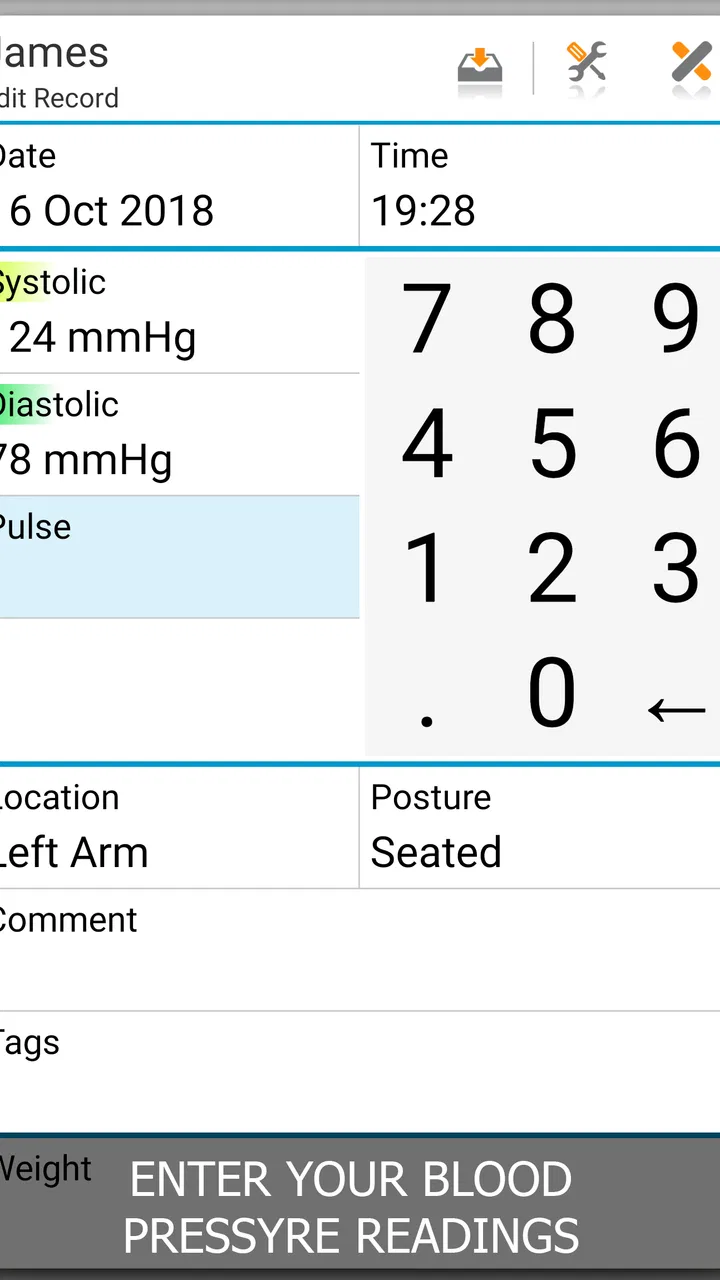
Blood Pressure Log - MyDiary is designed to help you record and organize blood pressure readings over time. You can typically save measurements such as systolic and diastolic pressure, pulse, date, time, and personal notes. It is useful for spotting trends and preparing information for a doctor, but it should be treated as a tracking tool rather than a medical device or a substitute for professional diagnosis.
02Can Blood Pressure Log - MyDiary measure blood pressure by itself?
No. The app does not replace a clinically validated blood pressure monitor and cannot reliably measure blood pressure using only a phone. You need to enter readings obtained from a compatible home monitor or taken by a healthcare professional. For more meaningful records, measure under consistent conditions, sit quietly beforehand, and follow the instructions supplied with your monitor.
03Can I use the app to track more than blood pressure readings?
The app is primarily focused on blood pressure records, but its usefulness may extend to related information such as pulse values, measurement times, notes, symptoms, medication reminders, or other health details, depending on the version installed. Before relying on a specific feature, check the current app description and settings, since available tools can differ between Android and iOS releases.
04Can I share or export my blood pressure history with my doctor?
A major benefit of keeping readings digitally is having an organized history available during medical appointments. Blood Pressure Log - MyDiary may provide options such as summaries, charts, reports, or sharing, although the exact export formats and sharing methods can vary by platform and version. Review the app’s menu after installation and confirm that the resulting information is complete before sending it.
05Is Blood Pressure Log - MyDiary suitable for diagnosing or treating hypertension?
No. The app can help you maintain a personal log, identify patterns, and remember information for discussions with a healthcare professional, but it cannot diagnose hypertension or recommend treatment. Do not change medication based only on entries in the app. If readings are repeatedly high, unusually low, or accompanied by concerning symptoms, contact a qualified healthcare provider promptly; seek urgent care for severe or alarming symptoms.
Pros
- Quickly records blood pressure
- pulse
- weight
- and related notes.
- Clear charts make it easy to spot trends over time.
- Supports multiple profiles for tracking family members.
- Custom reminders help users maintain a regular logging routine.
- Exportable records can be useful during medical appointments.
Cons
- It does not measure blood pressure without a compatible external device.
- Some advanced tools may require a premium subscription.
- Manual entry can be inconvenient for users wanting automatic syncing.
- Health insights should not replace advice from a qualified medical professional.
- Data accuracy depends on using a properly calibrated blood pressure monitor.

Blood Pressure Log - MyDiary
Gallery